1. Agent 核心实现 - Agent Loop
Agent 和 Chat 的区别
| 维度 | Chat | Agent |
|---|---|---|
| 交互模式 | 问答,用户驱动 | 自主,目标驱动 |
| 能力边界 | 生成文本、图片、视频等 | 可以通过调用工具,影响真实世界 |
| 执行流程 | 用户提问 → 模型回答 | 用户下达任务 → 思考 → 调用工具 → 观察 → 思考 → … → 返回答案 |
| 状态管理 | 每轮对话独立 | 维护完整的消息历史,包含工具调用与返回结果 |
| 自主性 | 无 | 模型自主决定“下一步”,“使用什么工具”,“何时停止” |
Agent 核心架构
1. LLM 客户端初始化
2. 工具定义(Tool Shcema)
3. 工具实现(Tool Functions)
4. Agent 循环(Core Loop)
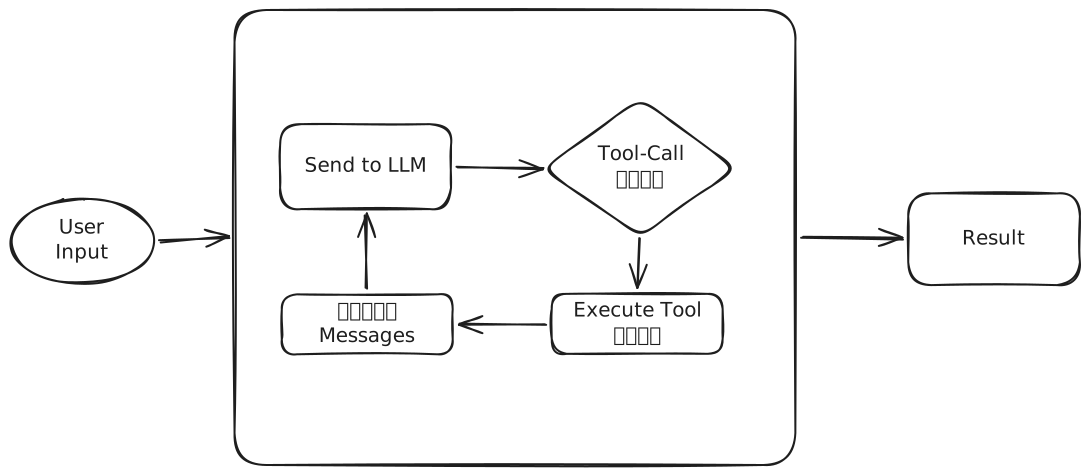
Agent 循环的执行顺序
具体举例:
- 用户输入“统计当前文件夹文件数,新建并写入到count.txt”
- [第一轮循环]发送给 LLM,LLM返回的不是普通文本,而是一个tool_call,请求调用工具
- 收到 LLM 的工具调用请求,本地调用工具
- 追加调用的结果到 messages
- [第二轮循环] 发送给LLM,LLM收到了调用的文件数结果,决定写入文件,返回一个tool_call
- 收到 LLM 的工具调用请求,本地调用工具
- 追加调用的结果到 messages
- [第三轮循环] 发送给LLM,LLM收到调用结果是成功,判断任务完成,返回纯文本
- 退出循环,用户收到LLM的创建成功的消息
import { OpenAI } from "openai";
import { ChatCompletionMessage } from "openai/resources/index";
import { tools, toolsMap } from "./tools";

type ChatMessage = OpenAI.Chat.Completions.ChatCompletionMessageParam;

/**
 * 调用 LLM
 * @param messages
 * @returns
 */
async function callLLM(
  messages: ChatMessage[],
): Promise<ChatCompletionMessage> {
  const config = new Config();
  const { apiKey, baseURL, model } = config;
  if (!apiKey) {
    console.error("Error: OPENAI_API_KEY environment variable is required");
    process.exit(1);
  }
  const client = new OpenAI({
    apiKey,
    baseURL,
  });
  const resp = await client.chat.completions.create({
    model,
    messages,
    tools,
  });
  return resp.choices[0]?.message;
}

/**
 * 核心代码,实现AgentLoop,通过循环让大模型持续使用工具
 * @param userInput
 * @param maxIterations
 * @returns
 */
async function agentLoop(userInput: string, maxIterations = 20) {
  const messages: ChatMessage[] = [
    {
      role: "system",
      content:
        "You are a helpful assistant that can interact with the system using bash commands. Be concise and helpful.",
    },
    {
      role: "user",
      content: userInput,
    },
  ];
  for (let i = 0; i < maxIterations; i++) {
    console.log(`\n[Iteration ${i + 1}/${maxIterations}]`);
    const msg = await callLLM(messages);
    messages.push(msg);
    if (msg.content) {
      console.log(`\nAssistant: ${msg.content}`);
    }
    if (msg?.tool_calls?.length) {
      for (const toolCall of msg.tool_calls) {
        if (toolCall.type === "function") {
          const funcName: string = toolCall.function.name;
          const args = JSON.parse(toolCall.function.arguments || "{}");
          console.log(`\n[Tool Call] ${funcName}:`, args);
          let toolOutput = "";
          if (typeof toolsMap[funcName] === "function") {
            toolOutput = await toolsMap[funcName](args.command);
            console.log(`[Output]:\n${toolOutput}`);
          } else {
            toolOutput = `Unknown tool: ${funcName}`;
          }
          messages.push({
            role: "tool",
            tool_call_id: toolCall.id,
            content: toolOutput,
          });
        }
      }
    } else {
      // No more tool calls, we're done
      break;
    }
  }
  return messages;
}

async function main() {
  console.log("starting");
  const args = process.argv.slice(2);
  const userInput =
    args.length > 0 ? args.join(" ") : "List files in current directory";

  console.log("=== Any-Agent-Nano ===");
  console.log(`User: ${userInput}\n`);

  await agentLoop(userInput);
}

main().catch(console.error);

export default main;
核心工具
- Bash: 理论上有了 Bash,LLM可以实现所有东西,但是 如果不指明方向,LLM会过度发散,比如让它编辑一个文件,它甚至会使用 Python 来编辑。
- Read: 读取文件,是 LLM 开始编程的基石
- Write: 写入文件,读取 + 写入,就可以实现一个 code agent 原型了,但是当文件内容比较多的时候,覆盖写入会导致上下文过长
- Update/Edit: 编辑文件,部分写入可以优先减少上下文的长度,配合Diff,就可以实现新旧版本对比
设计理解
- 为什么设置 maxIterations? 这是一个安全阈值,防止LLM陷入死循环,确保程序最终能够停下来,在生产环境中,这个值通常更大,而且会配置多种复杂的执行条件。
- LLM 如何做出决定调用工具的?
LLM并没有执行代码或者调用函数,实际上是我们传入了
tools参数,LLM阅读了tools参数后,在适当的时候输出一段JSON,描述自己想要调用哪个函数,传入什么参数。我们收到这段JSON后,在本地执行真正的函数,再把结果返回给LLM。LLM是“大脑”,负责思考,tools和对应但函数是手脚,负责执行。
从实现核心,看 Agent 到底是什么?
从实现核心我们可以看出 Agent 的三个本质要素:
- 感知 - 通过工具获取外部信息
- 决策 - LLM 根据用户输入和已有的工具信息,决定下一步决策
- 行动 - LLM 通过工具调用,影响外部环境
无论是OpenClaw、Claude Code 还是 OpenCode都遵循这个范式。当 OpenClaw 在创建定时任务、网页搜索、修改本地文件的时候,背后就是这样的 Agent Loop 在驱动。